JAMB CAPS stands for the Joint Admissions and Matriculation Board Central Admission Processing System. It is the official online platform JAMB uses to process, monitor, approve, and manage admissions into Nigerian universities, polytechnics, colleges of education, and other tertiary institutions.
If you applied for admission through UTME or Direct Entry, JAMB CAPS is where you can check your admission status, know whether your school has recommended you for admission, accept or reject an admission offer, and monitor every stage of your admission process.
In simple terms, JAMB CAPS is the system that connects institutions and JAMB during admission. Without CAPS, your admission cannot be officially processed by JAMB.
Quick Answer
JAMB CAPS (Central Admission Processing System) is JAMB’s official admission platform. It allows candidates to check their admission status, accept or reject admission offers, monitor admission progress, and ensure their admission has been processed correctly. Every UTME and Direct Entry candidate should check CAPS regularly during the admission period.
What Does JAMB CAPS Mean?
Before JAMB introduced CAPS, the admission process was less transparent.
Candidates often had no way of knowing:
- Whether their school had recommended them for admission.
- Why they had not been admitted.
- Whether another course had been offered.
- Whether they needed to take any action.
To solve these problems, JAMB introduced the Central Admission Processing System (CAPS).
Today, CAPS allows candidates to follow their admission process from beginning to end.
Instead of waiting endlessly, you can log in and see what stage your admission has reached.
Why Did JAMB Introduce CAPS?
JAMB introduced CAPS to make admission more transparent, fair, and easier to monitor.
Before CAPS, some admission processes lacked transparency, and candidates had limited information about their application status.
With CAPS, candidates can now:
- Monitor their admission progress.
- Accept or reject admission offers.
- Confirm that their admission is genuine.
- View transfer approvals where applicable.
- Ensure admissions follow JAMB guidelines.
This has greatly reduced confusion during admission.
How Does JAMB CAPS Work?
Many students think CAPS automatically admits candidates.
That is not how it works.
CAPS only processes admissions after schools submit qualified candidates.
Here is the normal process.
Step 1: You Register for UTME or Direct Entry
Your admission journey starts when you register with JAMB.
During registration, you choose:
- Your preferred institution.
- Your course.
- Your examination centre.
Step 2: You Meet the School’s Requirements
After writing UTME, you must satisfy your institution’s admission requirements.
These may include:
- Required JAMB score.
- Correct subject combination.
- Appropriate O’Level results.
- Participation in Post-UTME or screening.
Only qualified candidates move to the next stage.
Step 3: The School Selects Qualified Candidates
After screening, the institution prepares a list of candidates who meet its admission requirements.
This list is based on:
- Merit.
- Departmental cut-off marks.
- Available admission quota.
- Catchment area policy where applicable.
Step 4: The School Uploads the List to JAMB CAPS
Once the school finalizes its list, it uploads successful candidates to CAPS.
This is where JAMB begins processing the admission.
Without this upload, CAPS cannot display any admission offer.
Step 5: JAMB Reviews the Admission
JAMB checks whether the admission complies with its guidelines.
If everything is correct, your admission status begins to change.
Depending on the stage, CAPS may display messages such as:
- Admission in Progress.
- Admission Recommended.
- Congratulations.
- Not Admitted.
Each of these statuses has a different meaning, and each requires a different response.
Step 6: Candidate Accepts or Rejects Admission
Once your admission appears on CAPS, you have two options:
- Accept Admission.
- Reject Admission.
Most candidates should accept the admission if they intend to study the offered course.
Rejecting admission means you are declining the offer.
Who Should Use JAMB CAPS?
JAMB CAPS is not only for students who have already been admitted.
It is useful for every candidate applying for admission.
You should use CAPS if you are:
- A UTME candidate.
- A Direct Entry applicant.
- Waiting for admission.
- Offered another course.
- Checking admission progress.
- Confirming that your admission is genuine.
If you applied for admission through JAMB, CAPS is one of the most important platforms you should monitor.
What Can You Do on JAMB CAPS?
Many candidates think CAPS is only for checking admission.
In reality, it provides several useful functions.
You can use CAPS to:
- Check your admission status.
- Accept admission.
- Reject admission.
- View admission transfer requests.
- Monitor admission progress.
- Confirm whether your institution has recommended you.
- Track changes made to your admission.
Because of these features, checking CAPS regularly during the admission season is highly recommended.
Why Is JAMB CAPS Important?
Ignoring CAPS can create unnecessary problems.
For example, your school may have already offered you admission, but if you never check CAPS, you may not know when to accept it.
Similarly, CAPS may indicate that your institution has offered you a different course.
If you do not review your status, you could miss important information.
Checking CAPS regularly helps you stay informed throughout the admission process.
When Should You Start Checking JAMB CAPS?
Many students ask whether they should wait until admission lists are released before checking CAPS.
The answer is No.
You should begin checking CAPS once your institution starts processing admissions.
If your school has:
- Completed Post-UTME.
- Released departmental cut-off marks.
- Started releasing admission lists.
then it is a good time to begin monitoring CAPS regularly.
You do not need to check every hour, but checking every few days is a good habit during the admission season.
Common Misconceptions About JAMB CAPS
Many students misunderstand how CAPS works.
Here are some common myths.
“JAMB Gives Admission Without the School”
False.
Schools recommend candidates first.
JAMB processes those recommendations through CAPS.
“Once I Pass JAMB, CAPS Automatically Admits Me”
False.
Passing UTME alone does not guarantee admission.
You must still satisfy your institution’s admission requirements.
“Only Admitted Students Need CAPS”
False.
Every admission candidate should monitor CAPS because it shows the progress of your admission, even before a final decision is made.
“I Can Ignore CAPS If My School Has Admitted Me”
This is risky.
Your admission should also appear on CAPS so that it is officially recognized by JAMB.
What You Will See on JAMB CAPS
One of the reasons many students become confused is that JAMB CAPS does not always display the same message throughout the admission process.
Your admission status changes as your institution and JAMB process your application.
Below are the most common statuses and what they mean.
Admission in Progress
This means your admission is currently being processed.
Your institution has started working on your admission, but the process has not been completed yet.
Should you worry?
No.
This is usually a positive sign. It means you should continue checking CAPS until the status changes.
Admission Recommended
This means your institution has recommended you for admission and has forwarded your details to JAMB.
Your admission is awaiting final processing.
In many cases, this status later changes to Congratulations after JAMB completes its review.
Congratulations
This is the status every candidate hopes to see.
It means your admission has been approved.
Once you see this message, carefully read the instructions on CAPS and proceed to accept your admission if you wish to study the course offered.
Not Admitted
Many students panic immediately after seeing this.
However, “Not Admitted” does not always mean your admission journey has ended.
Possible reasons include:
- Your institution has not uploaded your admission yet.
- Another batch is still being prepared.
- Your admission is still under review.
- The admission process has not started for your course.
Continue checking until your institution officially concludes admission.
No Admission Given Yet
This simply means there is no admission decision available at the moment.
It does not automatically mean rejection.
Step-by-Step Guide: How to Access JAMB CAPS

Many candidates find CAPS difficult to open, especially when using a smartphone.
Follow these steps carefully.
Step 1: Visit the JAMB e-Facility Portal
Open your web browser and visit the official JAMB e-Facility portal.
Always use the official website to avoid phishing or fake portals.
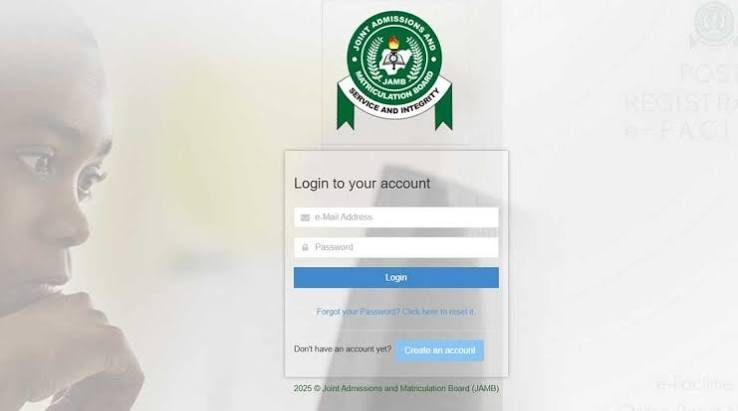
Step 2: Log In
Enter:
- Your registered email address.
- Your password.
These should be the same details you used during JAMB registration.
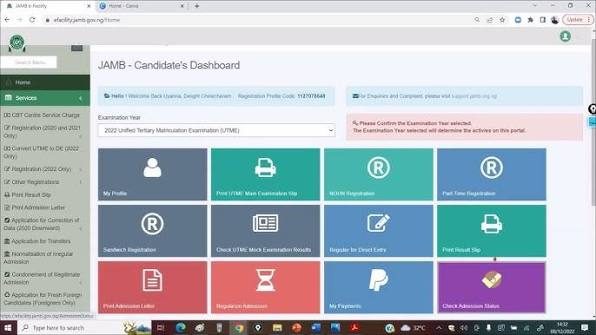
Step 3: Locate CAPS
After logging in, scroll through the available services and select Check Admission Status or CAPS, depending on the available options.
Step 4: Switch to Desktop View (If Using a Phone)
Some CAPS features may not display properly on the mobile version of your browser.
If necessary:
- Open your browser menu.
- Select Desktop Site or Desktop Mode.
- Refresh the page.
This usually reveals the complete CAPS interface.
Step 5: Check Your Admission Status
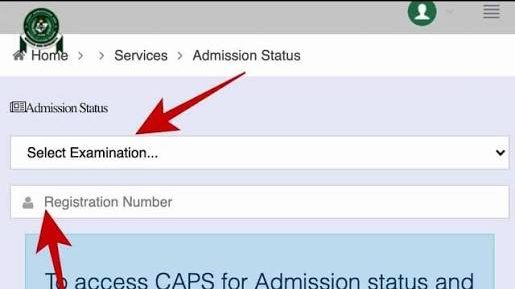
Open the Admission Status section.
You will see your current admission stage.
If admission has been offered, you can proceed with the next required action.
What Should You Do After Checking CAPS?
Your next step depends on the status displayed.
If It Shows “Admission in Progress”
Do not make unnecessary changes to your application.
Continue checking every few days.
Avoid believing rumours that suggest this status means automatic admission or automatic rejection.
If It Shows “Congratulations”
Read the admission details carefully.
If you are satisfied with the course and institution offered:
- Accept the admission.
- Print your admission documents when available.
- Follow your school’s registration instructions.
If It Shows “Not Admitted”
Remain patient.
Continue monitoring both CAPS and your institution’s admission portal.
Many schools upload additional batches later.
If Nothing Has Changed
There is usually nothing you need to do immediately.
Simply continue monitoring official updates.
Why Some Students Cannot Access CAPS
Sometimes candidates complain that CAPS refuses to open.
Common causes include:
Using the Wrong Email Address
Always log in with the email linked to your JAMB profile.
Browser Problems
Older browsers may not display CAPS correctly.
Updating your browser or using Desktop Mode often solves the issue.
Poor Internet Connection
A slow connection may prevent pages from loading properly.
Try again when your connection is stable.
Temporary System Maintenance
JAMB occasionally performs updates on its portal.
During such periods, some services may be temporarily unavailable.
Simply wait and try again later.
Common Mistakes Students Make
Avoid these mistakes when using JAMB CAPS.
Checking Only Once
Admission status can change several times during the admission season.
Continue checking periodically.
Ignoring CAPS After School Admission
Your institution’s admission should also be reflected on CAPS.
Do not assume your admission process is complete until you verify it.
Sharing Login Details
Never give your JAMB email or password to another person unless absolutely necessary.
Protect your account from unauthorized access.
Rejecting Admission Without Understanding the Consequences
Rejecting admission is a serious decision.
Once rejected, recovering that admission may not be possible.
Be sure you fully understand your options before making a decision.
Depending on Rumours
Always rely on official information from JAMB and your institution.
Avoid making decisions based on screenshots or social media posts from unofficial sources.
Things Most Students Don’t Know
- CAPS does not admit candidates automatically; institutions initiate the process.
- Different admission statuses have different meanings and require different actions.
- Admission can remain “In Progress” for days or weeks before changing.
- CAPS may update before your school’s admission portal—or vice versa.
- You should continue checking CAPS even after your school begins releasing admission lists.
- CAPS is useful throughout the admission process, not just after admission has been offered.
Important Warning
Never pay anyone who claims they can “change your CAPS status” or guarantee admission through unofficial means.
Only your institution and JAMB can process admissions through CAPS.
If anyone asks for money to alter your CAPS status, treat it as a red flag and verify any claims through official channels.
Frequently Asked Questions (FAQs)
1. What is JAMB CAPS?
JAMB CAPS stands for Central Admission Processing System. It is the official platform created by JAMB to process admissions into Nigerian universities, polytechnics, colleges of education, and other tertiary institutions. It also allows candidates to check, accept, or reject admission offers.
2. Is JAMB CAPS compulsory for all candidates?
Yes. Every UTME and Direct Entry candidate seeking admission through JAMB should monitor CAPS. It is the official platform where JAMB processes admissions and updates candidates’ admission status.
3. Can I gain admission without JAMB CAPS?
No. Admission into institutions that process admissions through JAMB should appear on CAPS. If your admission is not reflected there, it may not be fully recognized by JAMB.
4. How often should I check JAMB CAPS?
You do not need to check every hour. During the admission season, checking every few days is usually enough. You should also pay attention to announcements from your preferred institution.
5. Why is my JAMB CAPS showing “Admission in Progress”?
This means your admission is currently being processed. It is generally a positive sign and indicates that the admission exercise has not yet been completed.
6. What does “Congratulations” mean on JAMB CAPS?
It means JAMB has approved your admission. If you are satisfied with the institution and course offered, you should proceed to accept the admission and complete the next registration steps.
7. Can my school admit me before it appears on CAPS?
Yes. Some institutions publish admission lists on their portals before the admission reflects on CAPS. However, your admission should eventually appear on CAPS as part of the official admission process.
8. What should I do if JAMB CAPS is not opening?
First, confirm that you are using the correct login details. If you are using a phone, switch your browser to Desktop Mode. Also check your internet connection and try again later if the JAMB portal is temporarily unavailable.
9. Can I reject admission on JAMB CAPS?
Yes. CAPS provides an option to reject admission, but you should only do so after carefully considering the consequences. Rejecting an admission offer may mean losing that opportunity permanently.
10. Does JAMB CAPS update automatically?
Yes. Your admission status can change as your institution uploads information and JAMB processes it. This is why you should continue checking regularly throughout the admission period.
What Should You Do Next?
Now that you understand what JAMB CAPS is and how it works, here are the next steps you should take:
- Log in to your JAMB profile and confirm that you can access CAPS.
- Ensure your O’Level result has been uploaded correctly if required.
- Monitor your admission status regularly during the admission period.
- Read every status carefully before taking any action.
- Avoid unofficial websites and individuals claiming they can manipulate your CAPS status.
- Follow your institution’s admission announcements alongside JAMB updates.
Understanding CAPS early will help you avoid mistakes that delay or complicate your admission
Final Advice
JAMB CAPS is one of the most important tools every admission seeker in Nigeria should understand. It is more than just a website for checking admission it is the official system that shows the progress of your admission from the moment your institution submits your details until your admission is approved.
Do not wait until you hear rumours on social media before checking your status. Learn how CAPS works, monitor it regularly, and understand what each status means. That knowledge will help you make the right decisions at the right time and avoid unnecessary panic during the admission process.
Once your admission is offered, act promptly by completing every required step, including accepting your admission, printing your admission documents, and following your institution’s registration guidelines. Staying informed and relying only on official information will make your admission journey much smoother.