Checking your JAMB admission status is the easiest way to know whether you have been offered admission into your preferred university, polytechnic, or college of education. JAMB allows every UTME and Direct Entry candidate to check their admission status online through the JAMB e-Facility portal and JAMB CAPS (Central Admission Processing System).
If your school has started releasing admission, you should regularly check both your JAMB Admission Status and JAMB CAPS because your status can change as new batches are uploaded.
(Quick Answer)
You can check your JAMB admission status by logging into the JAMB e-Facility portal with your registered email and password. From there, open the Admission Status page or JAMB CAPS to see whether you have been admitted, your admission is still being processed, or your school has not yet uploaded your admission.
What Is JAMB Admission Status?
Your JAMB admission status is the official result of your admission application as recorded by JAMB.
Instead of guessing whether you have been admitted, the admission status page tells you exactly what stage your admission has reached.
Depending on your institution’s progress, your status may show messages such as:
- Congratulations
- Admission in Progress
- Not Admitted
- No Admission Given Yet
- Admission Recommended (on CAPS)
Each message has a different meaning, so understanding your status helps you know what action to take next.
Why You Should Check Your JAMB Admission Status
Many students make the mistake of checking only their school’s admission portal.
While your school portal is important, JAMB Admission Status confirms whether your admission has been officially processed through JAMB.
Checking your admission status helps you:
- Know if you have been offered admission.
- Confirm that your admission is genuine.
- Know when to accept your admission.
- Monitor admission progress.
- Avoid missing important deadlines.
- Prepare early for clearance and registration.
It should become a regular habit once your institution begins releasing admissions.
When Should You Start Checking Your Admission Status?
You do not need to wait until all schools finish admission.
Begin checking your admission status when:
- Your school has completed Post-UTME.
- Your institution announces that admission has started.
- The first admission list has been released.
- Other candidates in your school have started receiving admission.
Checking too early may simply show that no admission has been offered yet, which is normal.
Requirements Before You Check Your JAMB Admission Status
Before you begin, make sure you have the following:
- Your JAMB Registration Number.
- The email address used during JAMB registration.
- Your JAMB password.
- A phone, tablet, or computer with internet access.
- A stable internet connection.
Using the correct login details is very important.
If you use another email address, you may not be able to access your profile.
Method 1: How to Check JAMB Admission Status Through the JAMB e-Facility Portal
This is the most recommended method because it provides detailed admission information.
Step 1: Visit the Official JAMB Portal
Open your browser and go to the official JAMB e-Facility portal.
https://efacility.jamb.gov.ng/
Always use the official website to protect your account.
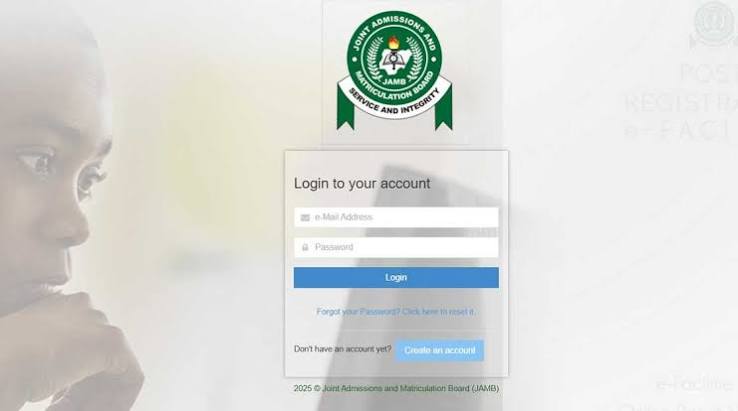
Step 2: Log In
Enter:
- Your registered email address.
- Your JAMB password.
Click Login.
If you cannot remember your password, use the password recovery option before proceeding.
Step 3: Locate Admission Status
After logging in, scroll through the available services.
Click Check Admission Status.
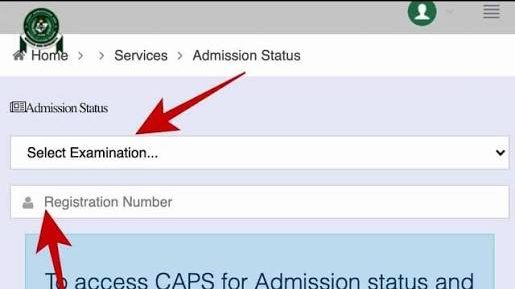
Step 4: Select Your Examination Year
Choose:
2026
from the available examination years.
Step 5: Enter Your Registration Number
Input your JAMB Registration Number carefully.
Double-check the number before submitting.
Step 6: Click “Check Admission Status”
After clicking the button, your admission status will appear.
If admission has been offered, the portal will display your admission details.
If no admission has been offered yet, you will also see the current status.
Method 2: How to Check Admission Through JAMB CAPS

JAMB CAPS provides more information than the normal admission status page.
Besides checking whether you have been admitted, CAPS also shows the progress of your admission.
Step 1: Log In to JAMB e-Facility
Use the same login details linked to your JAMB registration.
Step 2: Open CAPS
Locate the CAPS option from the available services.
Step 3: Switch to Desktop Mode
If you are using a smartphone:
- Open your browser menu.
- Select Desktop Site.
- Refresh the page.
Without Desktop Mode, some CAPS features may not appear correctly.
Step 4: Open Admission Status
Inside CAPS, select Admission Status.
Your current admission stage will be displayed.
What the Different Admission Status Messages Mean
Many students become confused because they do not understand the messages displayed.
Here are the most common ones.
Congratulations
This means you have been offered admission.
Your next step is to review the admission details carefully and accept the admission if you wish to study the course offered.
Admission in Progress
This means your admission is still being processed.
Your institution has started working on your admission, but the process has not yet been completed.
Continue checking regularly.
Not Admitted
This does not always mean you have lost admission.
Possible reasons include:
- Your institution has not uploaded another batch.
- Admission is still under review.
- Your course has not been processed yet.
Remain patient until your school officially concludes admission.
No Admission Given Yet
This simply means there is currently no admission decision available.
You should continue checking during the admission period.
Why Your Admission Status May Not Change Immediately
Many candidates expect their admission status to update immediately after their school releases an admission list.
That is not always the case.
Possible reasons include:
- JAMB has not processed the upload yet.
- Your institution is still uploading additional batches.
- Your department has not completed admission.
- System updates are still in progress.
It is normal for admission status to remain unchanged for some time.
Can You Check Admission Without Logging In?
Some candidates search for ways to check admission without signing into their JAMB account.
Although some admission status services allow you to use only your registration number, logging into your JAMB profile provides more complete and reliable information.
It also allows you to access CAPS and other important admission services.
What Should You Do After Checking Your JAMB Admission Status?
The next step depends on the admission status you see.
Many students check their status but do not know what to do afterward. Understanding the correct action can prevent mistakes that may delay your admission.
If Your Status Shows “Congratulations”
This means JAMB has approved your admission.
You should:
- Confirm the institution and course offered.
- Accept your admission on JAMB CAPS.
- Print your JAMB Admission Letter when it becomes available.
- Print your original JAMB Result Slip if required.
- Visit your school’s admission portal for further instructions.
- Pay your acceptance fee within the deadline.
- Begin preparing for clearance and registration.
Do not delay these steps because many schools set deadlines for newly admitted students.
If Your Status Shows “Admission in Progress”
This is usually a positive sign.
It means your admission is still being processed.
At this stage:
- Continue checking your admission status regularly.
- Do not make unnecessary changes to your JAMB profile.
- Keep monitoring your school’s admission announcements.
- Ensure your O’Level result has been uploaded correctly if required.
Admission in Progress does not mean you have been admitted yet, but it often indicates that your application is still active.
If Your Status Shows “Not Admitted”
Many candidates panic immediately after seeing this message.
However, you should first determine whether your school has completed its admission exercise.
Possible reasons include:
- Your institution is still releasing admissions in batches.
- Your department has not been uploaded.
- Your application is still under consideration.
- Admission processing has not reached your course.
If your school is still admitting candidates, continue checking your status.
If Your Status Shows “No Admission Given Yet”
This simply means there is no admission decision available at the moment.
You do not need to take any immediate action apart from monitoring updates.
Why Your JAMB Admission Status May Not Be Updating
Sometimes candidates check their admission status repeatedly but nothing changes.
This can happen for several reasons.
Your School Has Not Uploaded Admission Yet
Even if Post-UTME has ended, your institution may still be preparing its admission list.
Until your details are uploaded to JAMB, your status may remain unchanged.
JAMB Is Still Processing Admissions
After schools upload candidates, JAMB still needs to process the admission.
Depending on the volume of admissions being processed, this may take some time.
Admissions Are Released in Batches
Many institutions release:
- First Batch
- Second Batch
- Third Batch
- Supplementary Admission List
Not seeing your name in the first batch does not automatically mean you have been rejected.
O’Level Verification Is Still Ongoing
Some institutions verify candidates’ WAEC, NECO, or NABTEB results before completing admissions.
If verification is still in progress, your admission status may not change immediately.
Common Problems When Checking JAMB Admission Status
Some candidates encounter technical issues while trying to check their admission.
Here are the most common problems and how to solve them.
I Can’t Log In
Possible causes include:
- Incorrect email address.
- Wrong password.
- Typing errors.
Double-check your login details or reset your password if necessary.
The Portal Is Not Opening
This may happen because of:
- Poor internet connection.
- Heavy traffic on the JAMB website.
- Temporary maintenance.
Wait for a while and try again later.
My Admission Status Is Blank
A blank page does not necessarily mean something is wrong.
Refresh the page or try using another browser.
If the problem continues, wait and check again later.
CAPS Is Not Displaying Properly
If you are using a smartphone:
- Enable Desktop Mode.
- Refresh the page.
- Try another browser if necessary.
Desktop Mode usually resolves this issue.
Common Mistakes Students Make
Many admission problems happen because students make avoidable mistakes.
Checking the Wrong Website
Only use the official JAMB portal.
Avoid fake websites requesting your login details.
Ignoring CAPS
Some candidates only check the basic admission status page.
However, CAPS often provides more detailed admission information.
Forgetting to Upload O’Level Results
Even if your admission status has not changed, verify that your O’Level result has been uploaded where required.
Failure to do so can delay admission.
Waiting for Someone Else to Inform You
Do not depend on classmates or social media for admission updates.
Monitor your own admission regularly.
Missing Acceptance Deadlines
Some candidates celebrate admission but delay paying their acceptance fee.
Always read your institution’s instructions carefully after admission.
Things Most Students Don’t Know
Many applicants are unaware of these important facts:
- Your school portal and JAMB Admission Status may not update at the same time.
- Admission status can change several times during the admission period.
- Some schools release admissions department by department.
- CAPS sometimes updates before the normal admission status page.
- Checking your admission regularly helps you respond quickly when action is required.
- JAMB processes admissions throughout the admission season, not just on one day.
Important Warning
Never pay anyone who claims they can “upgrade” your admission status or guarantee admission.
JAMB admission is processed officially through your institution and JAMB CAPS.
If anyone requests payment to change your admission status, be cautious and verify all information through official channels.
Frequently Asked Questions (FAQs)
1. How can I check my JAMB admission status?
You can check your JAMB admission status by logging in to the official JAMB e-Facility portal with your registered email address and password. From there, select Check Admission Status or access JAMB CAPS for more detailed admission information.
2. Is JAMB CAPS different from the JAMB Admission Status page?
Yes. The JAMB Admission Status page simply tells you whether you have been admitted or not. JAMB CAPS provides additional information, such as your admission progress, admission recommendation, and options to accept or reject admission.
3. Why is my JAMB admission status showing “Not Admitted”?
This does not always mean you have lost admission. Your institution may still be processing admissions, uploading another batch, or waiting for JAMB to complete the admission process.
4. How often should I check my admission status?
You do not need to check every hour. During the admission season, checking every few days is usually enough. You should also monitor announcements from your preferred institution.
5. Can I check my JAMB admission status with only my registration number?
Yes, some JAMB admission services allow you to check using your registration number. However, logging into your JAMB profile gives you access to more complete admission information, including CAPS.
6. My school has released admission, but JAMB still says “Not Admitted.” What should I do?
This can happen if JAMB has not yet processed your institution’s upload. Continue checking both your school portal and JAMB CAPS. In many cases, the status updates after some time.
7. Can I still gain admission if my status has not changed?
Yes. Many institutions release admission in several batches. As long as your school has not officially concluded its admission exercise, your status may still change later.
8. What should I do after seeing “Congratulations” on my admission status?
Accept your admission on JAMB CAPS, print your admission documents when available, pay your acceptance fee within the deadline, and follow your institution’s clearance and registration procedures.
9. Why can’t I access JAMB CAPS on my phone?
Some CAPS features do not display properly on the mobile version of browsers. Switching your browser to Desktop Mode usually solves this problem.
10. Does checking my admission status frequently make JAMB update it faster?
No. Your admission status only changes when your institution uploads new information or JAMB processes your admission. Checking repeatedly does not speed up the process.
What Should You Do Next?
Now that you know how to check your JAMB admission status, here are the next steps:
- Save your JAMB login details in a secure place.
- Check your admission status regularly during the admission period.
- Monitor your JAMB CAPS alongside your school’s admission portal.
- Upload your O’Level result if you have not already done so.
- Prepare your admission documents in advance.
- Follow only official updates from JAMB and your institution.
Doing these things early will help you avoid unnecessary stress when your admission is released.
Final Advice
Checking your JAMB admission status is one of the most important steps after writing UTME and participating in your school’s admission process. It keeps you informed about your admission progress and helps you know exactly when to take action.
Do not rely on rumours or wait for someone else to tell you that admission has been released. Make it a habit to check both your JAMB Admission Status and JAMB CAPS regularly, especially after your institution starts releasing admission lists.
Once you receive admission, act quickly by accepting the offer, completing all required documentation, and following your institution’s registration instructions. Staying informed and responding on time will make your admission process much smoother and help you begin your academic journey without unnecessary delays.