The 2026 Unified Tertiary Matriculation Examination (UTME) conducted by the Joint Admissions and Matriculation Board (JAMB) has officially begun, with results for the first batch of candidates released starting from candidates who sat for the exam on April 16, 2026. For millions of Nigerian students across the country from Port Harcourt to Lagos, Abuja, and beyond this is a make-or-break moment. Your JAMB score determines whether you qualify for your dream course at university, polytechnic, or college of education. It opens doors to admission, scholarships, and a brighter future.
In previous years, candidates faced long queues at cybercafes or struggled with slow internet during result releases. But in 2026, JAMB has made the process simpler and more accessible by prioritizing the SMS method as the fastest and most reliable way to check your result immediately. This guide provides a complete, step-by-step breakdown of how to check your JAMB 2026 result using SMS. It is based on official JAMB announcements and statements from the Board’s spokesperson, Fabian Benjamin.
Whether you’re in a rural area with limited internet, a student who just finished the exam, or a parent helping your child, this SMS method requires no data, no portal login, and delivers your scores instantly to your phone. We’ll cover prerequisites, exact steps, what the SMS reply means, troubleshooting common issues, safety tips to avoid scams, and what to do next. By the end of this detailed guide, you’ll have everything you need to check your result confidently and move forward with your admission journey.
Why the SMS Method is the Best Option for JAMB 2026 Results
JAMB has explicitly stated that, as of the first batch release in April 2026, the only approved method for checking scores right now is via SMS. Full result slips (with your passport photo, detailed subject breakdown, and official stamp) will be available later on the e-Facility portal, but for immediate access to your aggregate score and subject performance, SMS is king.
Advantages include:
- Works offline, no internet or Wi-Fi needed.
- Instant delivery, usually within seconds or minutes.
- Available 24/7 once results for your batch are out.
- Costs only the price of one SMS (N50 airtime deduction).
- Secure, sent directly from JAMB’s official shortcode (55019 or 66019).
JAMB has cautioned candidates against fake websites, “result upgrade” scammers, or anyone asking for money to “release” your result. Stick to the official SMS process, and you’ll stay safe.
Prerequisites Before Checking Your JAMB 2026 Result via SMS
Before sending any message, confirm these four things to avoid errors:
- Use the exact phone number linked to your JAMB registration, This is critical. JAMB ties every candidate’s profile to the SIM used during registration (usually the one you provided for the 2026 UTME). Using a different number will return an error like “This phone number was not used for registration.”
- Have at least N50 airtime, The service deducts the cost automatically. If your balance is below N50, the message may fail or not deliver the result.
- Ensure your phone can send SMS, No special app needed. Use the default messaging app on Android, iPhone, or any basic phone.
- Wait for your batch release, Results are released in batches. If you sat for the exam on April 16, check immediately. Later batches (e.g., April 17–22) will follow. JAMB has apologized for minor delays in some batches due to logistical reasons, but results are coming out steadily.
If you registered with MTN, Airtel, Glo, or 9mobile, the process works the same across all networks.
Step-by-Step Guide: How to Check JAMB Result 2026 Using SMS
Follow these exact steps carefully:
Step 1: Open your messaging app
Launch the default SMS or Messages app on your phone. Create a new message (do not reply to an old thread).
Step 2: Type the correct keyword in capital letters
In the message body, type exactly:
UTMERESULT
(No spaces, all uppercase, no extra words or punctuation). Some candidates have successfully used “UTME RESULT” with a space, but the official and most reliable format confirmed by JAMB sources is UTMERESULT (one word).
Step 3: Enter the recipient shortcode
Send the message to 55019 (primary) or 66019 (alternative). Both shortcodes are officially approved by JAMB for 2026.
Step 4: Send the message
Hit send. You will be charged N50 automatically if successful.
Step 5: Wait for the reply
Within seconds to a few minutes, you should receive an SMS from JAMB containing:
- Your full name
- JAMB Registration Number
- Your scores in English and the three other subjects you took
- Your aggregate score (out of 400)
- Any important notes (e.g., if your result is withheld or you were marked absent)
Example of what a successful SMS might look like:
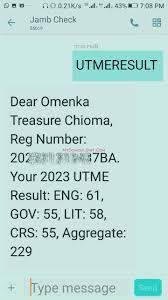
“Dear [Your Name], Your 2026 UTME Result is: English: 78, Mathematics: 65, [Subject 3]: 82, [Subject 4]: 70. Aggregate: 295. Thank you.”
Save or screenshot this SMS for your records.
What the SMS Reply Could Mean (and How to Interpret It)
JAMB’s automated system sends specific responses. Here’s what they mean:
- Score delivered — Success! You have your result.
- “This phone number was not used for registration” — Wrong SIM. Switch to the exact registered number.
- “Result not yet available” — Your batch hasn’t been released. Wait a few hours or check the next day.
- “Withheld” or “Under investigation” — Rare, but means JAMB is reviewing for malpractice. Visit a JAMB office with proof of identity.
- “Marked Absent” — You were recorded as not attending the exam.
- “Registration Cancelled” — Invalid entry (contact JAMB immediately).
If you get no reply after 10–15 minutes, double-check airtime and try again.
Common Problems and How to Fix Them (Troubleshooting Guide)
Many candidates face these issues in 2026:
- No airtime — Buy N50+ credit and retry.
- Wrong number — Borrow or use the exact registered SIM. If you lost the line, you’ll need to wait for the portal or visit a JAMB office.
- Network issues — Switch to a stronger signal or try a different network temporarily (but send from the registered number).
- Result delayed — JAMB has released results in batches. Some candidates from April 17–18 waited an extra day due to official engagements, but scores came through eventually.
- SMS fails repeatedly — Restart your phone, clear messaging cache, or try from another phone with the same SIM inserted.
Tip: If you’re in Port Harcourt or any high-traffic area, send during off-peak hours (early morning or late night) for faster delivery.
Safety Tips: Avoid Scams and Fraud in 2026
JAMB has issued strong warnings:
- Never pay anyone claiming they can “upgrade” or “release” your result faster.
- Ignore links or apps promising results for a fee.
- Do not manipulate or edit the official SMS, it is a criminal offence.
- Only use 55019/66019 and the official e-Facility portal (efacility.jamb.gov.ng) later for printing slips.
- Keep your registration number and password private.
Printing the official result slip (with photo) will cost N1,500 once activated on the portal. Log in with your registered email and password, go to “Print Result Slip,” pay, and download.
What Happens After Checking Your JAMB 2026 Result via SMS?
Your score is just the beginning. Next steps include:
- Compare it with your school’s cut-off marks.
- Upload O’Level results on the JAMB portal if not already done.
- Monitor your admission status on CAPS (Central Admissions Processing System).
- Prepare for Post-UTME screening.
(We’ll cover this in detail in a future guide: “JAMB 2026 Results: What Next After Checking Your Score?”)
Frequently Asked Questions (FAQs) About Checking JAMB Result 2026 via SMS
- Can I check from any phone? No, only the registered SIM.
- How much does it cost? Exactly N50 deducted from airtime.
- What if I sent the message before results were out? It will say not available yet.
- Is 66019 different from 55019? Both work; 55019 is primary.
- Can parents check for their child? Only if they have the child’s registered SIM.
- Will I get the full result slip via SMS? No, only scores. Full slip comes later via portal.
- What if my score is low? Consider change of course/institution before the deadline.
- Can I check multiple times? Yes, but each costs N50.
- Is there an email option? Not for direct checking, use your registered email only for portal login.
- What if I lose my phone? Visit any JAMB office with your registration details for assistance.
Conclusion: You’ve Got This!
Checking your JAMB 2026 result via SMS is quick, reliable, and designed for every Nigerian student. By following the exact steps above using UTMERESULT to 55019 from your registered line with N50 airtime you’ll have your scores in minutes. Stay calm, celebrate your hard work, and take the next smart steps toward admission.
Remember: Your JAMB score is important, but it’s not the end of your story. Many candidates with average scores still gain admission through strategic choices and strong Post-UTME performance. Keep positive, avoid scams, and focus on what’s next.
You did the exam, now claim your result the official way!