If JAMB CAPS has offered you admission, you must accept it on the CAPS portal before completing many admission-related processes. Accepting admission confirms that you are willing to study the course and institution that offered you admission. If you fail to accept it within the required period, you may face delays in printing your admission letter or completing your school’s registration.
Quick Answer:
To accept admission on JAMB CAPS, log in to your JAMB profile through the CAPS portal, check your admission status, and click Accept Admission if an offer has been made. After accepting, print your JAMB Admission Letter and Original Result Slip, then proceed with your school’s acceptance fee and clearance processes.
What Does It Mean to Accept Admission on JAMB CAPS?
Accepting admission simply means you officially agree to the admission offered by your institution through JAMB.
Once you click Accept Admission, JAMB records that you have accepted the offer. This makes it easier to continue with the remaining admission processes.
Many universities require students to accept admission on JAMB CAPS before they can:
- Pay acceptance fees
- Print admission letters
- Complete clearance
- Register courses
- Participate in matriculation
If you delay unnecessarily, your registration process may also be delayed.
Before You Accept Admission
Before clicking the Accept Admission button, confirm the following:
- The school is your preferred institution.
- The course offered is the one you are willing to study.
- Your name appears correctly.
- Your admission is genuine and visible on CAPS.
- You have uploaded your correct O’Level result if required.
Do not rush because accepting admission is an important decision.
Requirements for Accepting Admission on JAMB CAPS
You will need:
- Your JAMB registration number
- Email address linked to your JAMB profile
- Password for your JAMB profile
- A phone or computer with internet access
- A modern web browser
- Stable internet connection
Using a laptop or desktop computer is usually easier because some CAPS features do not display properly on mobile browsers unless Desktop Mode is enabled.
Step-by-Step Guide to Accept Admission on JAMB CAPS

Step 1: Visit the JAMB e-Facility Portal
Open your browser and go to the official JAMB portal.
https://efacility.jamb.gov.ng/
Use only the official website to avoid fake portals.
Step 2: Log In
Enter:
- Your registered email address
- Password
Click Login.
If you cannot remember your password, use the password reset option before continuing.
Step 3: Open JAMB CAPS
After logging in:
- Locate the CAPS menu.
- Open the Central Admission Processing System.
If using a phone, switch your browser to Desktop Site if necessary.
Step 4: Check Admission Status
Click Admission Status.
The system will display one of several messages, including:
- Admission Recommended
- Admission in Progress
- Congratulations
- Not Admitted
- No Admission Given Yet
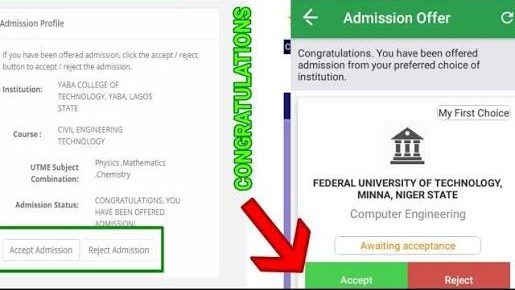
If you have been offered admission, an Accept Admission button will appear.
Step 5: Review Your Admission Carefully
Before accepting:
- Confirm the institution.
- Confirm the course.
- Check your personal information.
- Ensure everything is correct.
Once accepted, changing your decision later may be difficult.
Step 6: Click “Accept Admission”
Click the Accept Admission button.
The system may ask you to confirm your choice.
Click OK or Confirm.
Wait for the confirmation message.
Do not refresh the page while processing.
Step 7: Confirm That Acceptance Was Successful
After acceptance:
- Refresh the Admission Status page.
- Ensure your admission has been recorded.
- Take a screenshot if necessary for your records.
Sometimes the system updates immediately, while in other cases it may take a little time.
Step 8: Print Your JAMB Admission Letter
Once acceptance is completed successfully:
- Return to the JAMB portal.
- Print your Admission Letter when it becomes available.
This document will be required during school clearance.
Step 9: Print Your Original JAMB Result Slip
Many schools request the Original JAMB Result Slip during physical clearance.
Print it early to avoid last-minute delays.
Step 10: Continue With Your School’s Admission Process
Accepting admission on CAPS does not complete your admission journey.
You should now:
- Pay your acceptance fee.
- Complete online screening if required.
- Upload requested documents.
- Attend physical clearance.
- Pay school fees.
- Register your courses.
Each institution has its own procedures, so always follow your school’s instructions.
What Happens After You Accept Admission?
After accepting admission:
- Your admission becomes officially accepted on JAMB CAPS.
- Your JAMB Admission Letter becomes available after processing.
- Your school can continue processing your registration.
- You can proceed with clearance and other admission requirements.
Accepting admission on CAPS is only one part of the overall admission process. You must still complete every requirement set by your institution.
Can You Change Your Mind After Accepting Admission?
This is one of the most common questions candidates ask.
In many cases, accepting admission on JAMB CAPS means you have agreed to that admission offer. If you later decide you want another school or course, the process can become complicated and may require fresh admission processing or other official procedures.
For that reason, never click Accept Admission unless you are sure you want to study that course at that institution.
If you are still waiting for admission from another school, think carefully before accepting an offer from your current school.
Why Can’t I See the “Accept Admission” Button?
If the button is not showing, it could be due to one of these reasons:
1. You Have Not Been Offered Admission Yet
If your status still shows:
- Admission in Progress
- Not Admitted
- No Admission Given Yet
the Accept button will not appear.
2. CAPS Has Not Updated
Sometimes your school has already released an admission list, but JAMB CAPS is still processing the admission.
Wait and check again later.
3. Browser Problems
Some mobile browsers do not display all CAPS features.
Try:
- Enabling Desktop Mode
- Using another browser
- Using a laptop or desktop computer
4. Temporary JAMB Server Issues
During peak admission periods, JAMB servers may become slow.
If the portal is not responding, wait and try again later.
What If I Accidentally Clicked “Reject Admission”?
If you mistakenly rejected your admission, do not panic.
Contact your institution’s admission office immediately to ask whether your admission can still be processed. Also visit an accredited JAMB CBT centre for guidance if necessary.
The earlier you act, the better your chances of resolving the issue.
Can I Accept JAMB Admission Through SMS?
No. You cannot accept or reject your JAMB admission through SMS. JAMB does not provide any SMS code or text message option for accepting admission.
The only official way to accept or reject admission is by logging into your JAMB CAPS profile. If you do not have access to a computer or are finding the process difficult, visit an accredited JAMB CBT centre. The staff there can help you log into your JAMB profile and accept your admission correctly.
Be careful of anyone claiming they can accept your admission through an SMS or WhatsApp message. Such claims are false and may be a scam.
Common Mistakes Students Make
Many admission delays happen because of avoidable mistakes. Watch out for these:
Accepting Without Checking the Course
Some students only look at the school name and forget to confirm the course offered.
Always verify both before accepting.
Ignoring O’Level Upload
Even after receiving admission, failing to upload your O’Level result properly can create problems later.
Waiting Too Long
Some candidates postpone accepting admission for weeks without any good reason.
Complete the process once you have decided to accept the offer.
Using Fake Websites
Only use the official JAMB portal.
Avoid websites or agents that promise to “help you accept admission” for unnecessary fees.
Forgetting the Next Steps
Accepting admission alone is not enough.
You must also complete:
- Acceptance fee payment
- Clearance
- School fees payment
- Course registration
- Medical screening (if required)
Things Most Students Don’t Know
- Your school’s admission list and JAMB CAPS may not update at exactly the same time.
- Some schools require you to accept admission on CAPS before paying acceptance fees.
- Printing your Admission Letter is usually done after accepting admission.
- CAPS updates can sometimes take several hours or days after changes are made.
- Accepting admission does not automatically register you as a student—you must still complete your institution’s admission procedures.
Frequently Asked Questions
Can I accept admission using my phone?
Yes. However, if some CAPS features are missing, enable Desktop Mode in your browser or use a computer.
Is accepting admission on JAMB CAPS compulsory?
Yes. For most candidates, accepting admission is an important step before completing other admission processes.
How long does it take for acceptance to reflect?
It may appear immediately or after some time, depending on JAMB’s system.
Can I pay my acceptance fee before accepting admission on CAPS?
Some schools allow it, while others require you to accept admission on CAPS first. Always follow your institution’s instructions.
Can I print my admission letter before accepting admission?
Generally, candidates are expected to accept admission before printing the JAMB Admission Letter.
What if my school has admitted me but CAPS has not updated?
Wait for the school’s admission details to synchronize with JAMB CAPS. Continue checking your portal regularly.
Will accepting admission affect another admission I am expecting?
Yes, it can. If you are hoping for admission into another institution or course, consider your decision carefully before accepting.
What if I cannot log in to my JAMB profile?
Use the password recovery option on the JAMB portal. If the problem persists, visit an accredited JAMB CBT centre for assistance.
If you have received an admission offer on JAMB CAPS, don’t rush to click Accept Admission without confirming the school and course. Once you are satisfied with the offer, accept it promptly, print your JAMB Admission Letter when available, and begin your school’s admission processes, including acceptance fee payment, clearance, and course registration.